
Blog Guide
Why online shoppers leave, and how to keep them
About 70% of online shopping carts are abandoned before checkout, according to the Baymard Institute. 4 practical tips to keep shoppers on your site.
Do customers find your website, then leave quickly and abandon their carts? About 70% of online shopping carts are abandoned before checkout, according to the Baymard Institute.
A shopper’s interest can vanish in seconds. Here’s why shoppers leave, and 4 simple tips to keep them until checkout.
Why shoppers leave without buying
Common reasons include:
- the product, price or delivery isn’t right
- poor customer support: slow replies, an unhelpful chatbot, a busy phone line or being sent off the site to email
- an unpleasant experience: pop-ups, poor-quality images, thin product descriptions or little trust in the store
- a language barrier in customer support
- technical errors, for example when the payment doesn’t go through
Tip 1: Don’t rely on contact details in the header or footer
Customers often need to check something before they buy. Whether the sale goes through depends on how easy and fast your support is to reach.
One of the most common mistakes is putting your contact details in the wrong place.
An email address or phone number in the header or footer can take customers off your site.
When customers who need help head for the footer or contact page, their visit is likely to end there.
Customers choose different channels depending on the situation, the time of day, where they are, background noise and more. Most businesses offer 4 main ways to get in touch:
- phone
- social media
- live chat
Email and social media often pull customers off your site and away from the purchase.
You also lose valuable information about what the customer does next.
Are they still on the site? Are they going ahead with the purchase?
Once someone leaves for their email or a social media app, there’s only a small chance they’ll come back.
Tip 2: Avoid annoying chats and bots
- Oh no, not that annoying chatbot…
- That chat is popping up again!
- I just want to ask a question, not share my data!
- Well? Is anyone going to answer?
- Wait, where did the conversation go?
Reactions like these are unlikely to make anyone more eager to buy from you, or more loyal to your brand.
Many companies now understand that support speed and quality are tied to sales figures.
Estonian online stores use both free and paid support tools. Examples include Zendesk, Fin (formerly Intercom), Freshdesk, tawk.to and Askly.
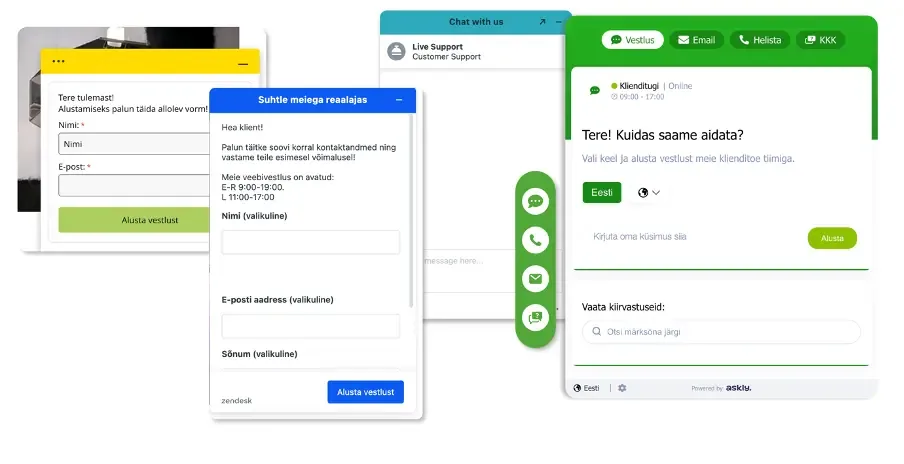
Customer support tools used on Estonian websites
Tip 3: Help customers buy instead of collecting their data
Customers often have to hand over their personal details before they can contact support.
Compare that with a physical store: nobody has to identify themselves before asking a salesperson for the right size.
Let people ask their question easily, with nothing in the way. With a good chat tool, you can ask for details later, in the middle of the conversation.
Every question also shows you where your buying process can improve.
Tip 4: Give online shoppers an in-store experience
On a well-designed website, friendly and personal support makes shopping smoother.
Some business owners still believe online shoppers don’t want to ask for help. But think about yourself.
Don’t you sometimes want to ask for help when you shop online? However user-friendly your website is, it often can’t replace talking to a real person.
Here are a few stores that stay in touch with customers at every step of the purchase:
Marmara Sterling, Macta Beauty, ONOFF and Adduco are Askly customers.

Where Askly fits
Above all, we want to raise the bar for customer support in e-commerce. So we’re building the best support tool we can, at a price every business can afford.
- One AI agent, one inbox. It answers web chat, Facebook Messenger, Instagram DMs and email from one knowledge base.
- Phone calls too. The AI Voice Agent answers on your own number, around the clock. It says it’s an AI.
- Help in the shopper’s language. Askly detects it automatically. 30+ languages work instantly, and your team answers in its own, translated in real time.
- A person when it matters. In AI + team mode, someone from your team takes over mid-chat with the full context.
Installing the chat takes minutes: a script in your site’s head tag, or the WordPress plugin. Building and reviewing the knowledge base takes about an afternoon.
More than 1,000 businesses use Askly.
Where do your shoppers go for help?
Try it yourself: open your website on your phone and look for help with a question before you buy.
If you end up in the footer or your email app, so do your shoppers. That’s the place to start.